24 months. $0 to $1B ARR. $29B valuation.
Cursor isn’t just “growing fast”—it shattered every assumption about how quickly a SaaS company can scale. But what most people don’t know is that one of the company’s most critical early innovations quietly disappeared from the settings.
This isn’t a story of failure. Knowing when to kill your darlings is precisely why they’re outpacing everyone else.
In this article, I’ll explain what Shadow Workspace is, why it once gave Cursor a massive edge over Copilot, and why it might have been removed.
How Cursor Reached $1B ARR in Two Years
In November 2025, Anysphere—the company behind Cursor—announced it had crossed $1B ARR, with its valuation soaring to $29.3B. This broke every record. Wiz took 18 months to grow from $1M to $100M ARR. Deel took 20 months. Cursor? It hit $100M ARR roughly 12 months after launch, then added another $900M in the following year.
Many attribute this to the AI coding wave. But if it were just the wave, why didn’t GitHub Copilot achieve the same growth curve?
The answer lies in one architectural decision: Copilot is a VS Code extension. Cursor is a fork of VS Code itself.
This decision allowed Anysphere to do things Copilot could never do—deep control over every layer of the editor. One of the most critical innovations? Shadow Workspace.
The Problem: AI’s “Hallucination Loop”
If you’ve used any AI coding assistant, you’ve experienced this frustrating loop:
AI generates code that looks perfect. You paste it in. Build fails. You ask the AI to fix it. It gives you another version. Fails again. After three rounds, you realize it hallucinated an API that doesn’t exist.
This isn’t bad luck. It’s a structural problem.
Traditional AI coding assistants (including early Copilot) use a strategy called Neighboring Tabs—they only look at your currently open tabs to infer context. But having 5 tabs open doesn’t mean understanding the entire codebase. The AI doesn’t know your project’s custom types, internal APIs, or linter rules.
Worse, AI generates code far faster than you can validate it. Every time you accept a suggestion, discover it’s broken, and ask for a fix, that feedback loop costs you 30 seconds to several minutes. Over a day, you might waste an hour or two.
Cursor’s engineers faced the same problem. Their solution: Validate the code in a “parallel universe” before you ever see it.
That parallel universe is the Shadow Workspace.
Shadow Workspace Design Goals
According to Cursor’s official technical blog, Shadow Workspace has three core design goals:
1. LSP-usability
The AI must be able to see linter errors for the code it generates, use Go to Definition, and interact with all features of the Language Server Protocol. This means the AI isn’t writing code in a vacuum—it’s writing in an environment with full toolchain support.
2. Independence
The user’s development experience must remain unaffected. If the AI is validating in the background, the user’s editor can’t lag, flicker, or enter weird states. The user shouldn’t even realize it’s happening.
3. Runnability
This is the ultimate endgame: the AI should be able to execute its generated code and see the output. Static analysis catches syntax errors, but logic errors only surface at runtime.
These goals sound intuitive, but they’re extremely difficult to implement because the first two are inherently contradictory.
LSP needs a real filesystem—the Language Server must read node_modules, parse tsconfig.json, and trace import chains. But Independence requires isolation—any AI modifications can’t affect what the user sees.
You can’t have both “real environment” and “complete isolation.” Or rather, you need very clever engineering to get close to that ideal.
Technical Implementation: Hidden Electron Window
According to Cursor’s official blog, the team tried many approaches, all of which failed:
| Approach | Method | Why It Failed |
|---|---|---|
| A | Spawn independent Language Server (e.g., tsc, gopls, rust-analyzer) | Abandons VS Code extension ecosystem; can’t see diagnostics from Prisma, GraphQL, etc. |
| B | Clone Extension Host Process | State synchronization is a nightmare; too complex |
| C | Fork all major Language Servers | Maintenance cost too high; every upstream update requires merging |
| Final | Hidden Electron Window | Elegantly solves the problem |
The elegance of the final approach:
When AI needs to validate code, Cursor spawns a hidden Electron window (show: false). This window loads the same workspace, but the user can’t see it. The AI applies changes in this hidden window, then waits for LSP to report diagnostics.
If there are errors, the AI self-corrects in the background—the user is completely unaware. Only when the code passes all static checks does Cursor present the changes to the user.
The brilliance of this design:
- Full extension support: Because it’s a real VS Code window, all extensions work normally
- State isolation: The user’s window and shadow window are completely independent Electron processes
- Resource reuse: The shadow window is reused, not re-spawned each time
Visualized as an architecture diagram:
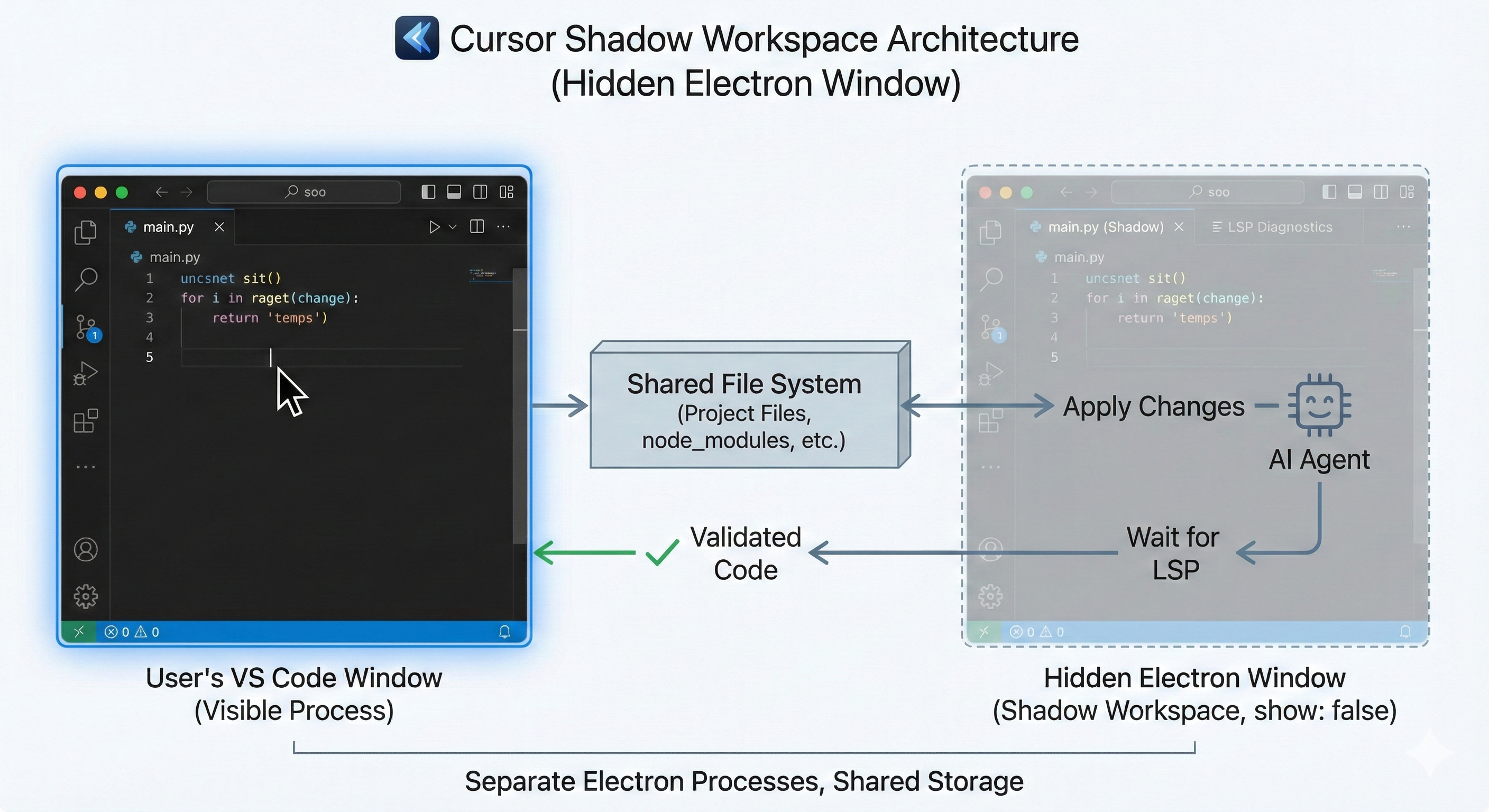
This is why Cursor’s code “usually just works”—it’s been pre-validated.
Runnability: The Next Frontier
LSP validation solves “will the code compile,” but there’s a deeper question: logical correctness.
Static analysis can’t catch runtime errors. A function might have perfect syntax and correct types but completely wrong logic. To validate logic, you must actually run it.
This introduces new technical challenges:
Disk Isolation
If AI can execute arbitrary code, it can also execute rm -rf /. Shadow Workspace needs some form of disk isolation so AI’s destructive actions only affect the sandbox environment.
The simplest approach is copying the entire project to /tmp, but this doesn’t work for large projects—node_modules alone can be several GB, and the I/O overhead of copying directly destroys the fast feedback loop. When your Agent waits 30 seconds to copy files for each validation, the entire design loses its purpose.
A more advanced approach uses VFS (Virtual File System) or FUSE (Filesystem in Userspace) to implement copy-on-write semantics: the AI sees real files when reading, but writes only modify a virtual layer without affecting originals.
Network Isolation
Beyond disk, AI-executed code might also make network requests. In enterprise environments, this could lead to data leakage. An ideal Shadow Workspace needs network-level isolation, allowing only specific outbound connections.
According to Cursor’s official blog, they’re exploring several directions:
- Cloud-based Shadow Workspace (may not suit privacy-sensitive users)
- Docker-based automatic containerization
- Kernel-level folder proxy
These are still in development. Cursor’s current version doesn’t have full Runnability support.
The Twist: Shadow Workspace Disappeared from Settings
If you look for Shadow Workspace in Cursor’s settings now, you won’t find it.
There was no official announcement about its removal, and no explanation was given. The original technical blog from September 2024 only mentioned it was an “opt-in” feature that increased memory usage—which may hint at why it was removed.
This decision made me think for a long time. Why would they remove a core technology that helped Cursor stand out?
The following is my speculation, not official explanation
1. Memory Consumption
Each Shadow Workspace is essentially a complete VS Code instance. For power users with dozens of tabs and extensions open, this could mean an extra 1-2 GB of RAM. On an M1 MacBook Air, that’s significant.
2. Maintenance Cost vs. Benefit Mismatch
While the Hidden Electron Window approach is elegant, maintenance isn’t cheap. Every VS Code upstream update requires ensuring the Shadow Workspace mechanism still works. If only 10% of users enable this feature, the ROI might not justify it.
3. Alternative Approaches Matured
Cursor has continued investing in other areas—better RAG, smarter Apply Model, more precise context selection. These improvements may have reduced Shadow Workspace’s marginal benefit. If AI generates correct code on the first try, you don’t need background validation.
4. Strategic Pivot
Cursor may be developing an entirely different validation mechanism. Perhaps cloud-based, perhaps a lighter local solution. Removing the old feature might be making room for new architecture.
Whatever the reason, this decision reminds us: Technical innovation doesn’t always survive. Product decisions are more complex than pure engineering. Sometimes, killing your darlings is the right choice.
Lessons for You: Building Validation into Your Own Agent
Even though Cursor removed Shadow Workspace, its design philosophy remains valuable. The core insight:
Validation matters more than generation.
If you’re building your own AI Coding Agent, here are some immediately actionable directions:
1. Use Git Worktree for Environment Isolation
Git Worktree lets you have multiple working directories under the same repo, sharing .git history. This is the lightest way to implement Shadow Workspace:
# Create an isolated environment for the Agent
git worktree add ../agent-workspace -b agent/fix-bug-123

# Agent works freely in this directory
# All changes don't affect the main directory

# Clean up when done
git worktree remove ../agent-workspace
Compared to copying the entire project, Worktree uses minimal extra disk space because it shares Git objects.
Note: Worktree doesn’t copy files ignored by
.gitignore(like.envornode_modules). You’ll need to runnpm installorpip installin the new worktree and ensure environment variables are properly configured. If your project has.env.example, remember to handle this in your Agent’s bootstrap script.
2. Docker + LSP for Safe Execution
Mount the Worktree into a Docker container and run the Language Server and tests inside:
docker run -v /path/to/worktree:/app \
           --network none \  # Network isolation
           my-agent-runtime \
           npm test
--network none ensures Agent-executed code can’t make outbound requests.
3. Implement a Self-Correction Loop
Don’t let AI generate only once. Design a loop:
def generate_and_validate(task: str, max_attempts: int = 3) -> str:
    for attempt in range(max_attempts):
        code = agent.generate(task)

        # Validate in Shadow Environment
        diagnostics = shadow_env.get_diagnostics(code)

        if not diagnostics.has_errors():
            return code

        # Feed error messages back to Agent
        task = f"""
        Previous attempt failed with errors:
        {diagnostics.format()}

        Original task: {task}

        Please fix the errors.
        """

    raise ValidationError("Max attempts exceeded")
This pattern is simple but effective. In my experience, 80% of “first-attempt failures” can be fixed in the second or third try.
4. Start with Worktree, Then Level Up
If you’re just starting to build an Agent system, here’s my recommendation:
| Week | Goal |
|---|---|
| 1 | Basic isolation with Git Worktree |
| 2 | Add Linter/Type Checker validation (full LSP not required) |
| 3 | Add Docker for runtime isolation |
| 4 | Implement Self-Correction Loop |
Don’t chase perfection from the start. Shadow Workspace was the result of years of iteration by the Cursor team, and even they chose to remove it—at least for now.
Conclusion
Shadow Workspace is a brilliant engineering innovation—it demonstrates how to give AI full access to the development environment without affecting user experience. Although the feature has been removed, the design philosophy behind it remains valuable for anyone building AI Agents.
If you remember only one thing:
Validation matters more than generation. Validating AI output before it reaches the user is the only reliable way to improve experience. Git Worktree + Docker is a “poor man’s Shadow Workspace” you can implement today.
Other takeaways:
- Isolation is essential: AI needs a real environment for validation but can’t pollute the user’s workspace
- Engineering reality: Even excellent technology may be abandoned due to cost, maintenance, or strategy—this isn’t failure, it’s product discipline
- Start simple: Don’t try to get it perfect on day one. Iteration is the way.
In the next article, I’ll discuss another core challenge in AI Agent architecture: Memory. Validation solves “will the code run,” but there’s a more fundamental problem—AI can’t remember who you are, can’t remember your project history, can’t remember the coding style you discussed last week.
Let’s talk about how to stop AI from being that coworker who has to re-introduce themselves every morning.
References
- Cursor Blog: Shadow Workspace — Official technical blog (September 2024) by co-founder Arvid Lunnemark, detailing design goals, failed attempts, and final implementation with settings screenshots
- Anysphere - Wikipedia — Source for $29.3B valuation and $1B ARR data
- GitHub Blog: How GitHub Copilot is getting better at understanding your code — Neighboring Tabs technical explanation
- Wiz Blog: $100M ARR in 18 months — SaaS growth speed comparison data
- SaaStr: Cursor Hit $1B ARR in 24 Months — Cursor growth data analysis
This is the first article in the “AI Agent Architecture in Practice” series. Next up: The Memory Revolution in AI Agents—From Stateless to 26% Accuracy Boost